

Schemas
Schemas
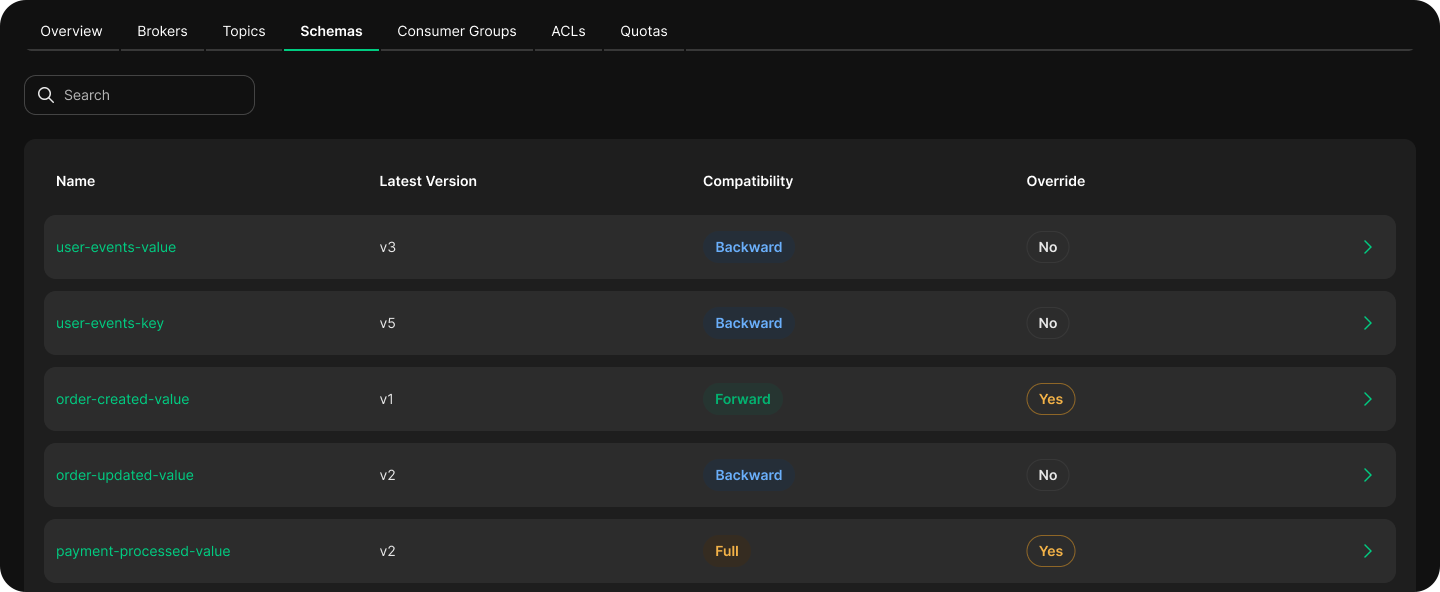
The Schemas tab displays all message schemas registered with your cluster's Schema Registry.
Overview
Lists all registered schemas with:
- Schema name: The subject name used to register the schema (typically
<topic>-keyor<topic>-value). - Latest version: The most recent schema version number.
- Compatibility mode: The evolution rule applied to this subject —
Backward,Forward, orFull.
Use this view to track which topics have governed message formats and verify schema coverage before creating API Products.
Compatibility Modes
| Mode | Description |
|---|---|
| Backward | New schema can read data written by the old schema. Consumers can upgrade first. |
| Forward | Old schema can read data written by the new schema. Producers can upgrade first. |
| Full | Both backward and forward compatible. Safest for shared APIs. |
| None | No compatibility enforced. |
Tips
For API Products published through Zilla Platform, Full compatibility is recommended to avoid breaking changes for consumers.
Overrides
Subjects can override the cluster-wide default compatibility mode. Overrides appear in the Schemas list alongside the subject they apply to.
Use overrides sparingly — they bypass global governance rules and should be documented as exceptions.