

Quotas
Quotas
The Quotas tab displays throughput limits applied to producers and consumers in your cluster, helping ensure fair resource allocation.
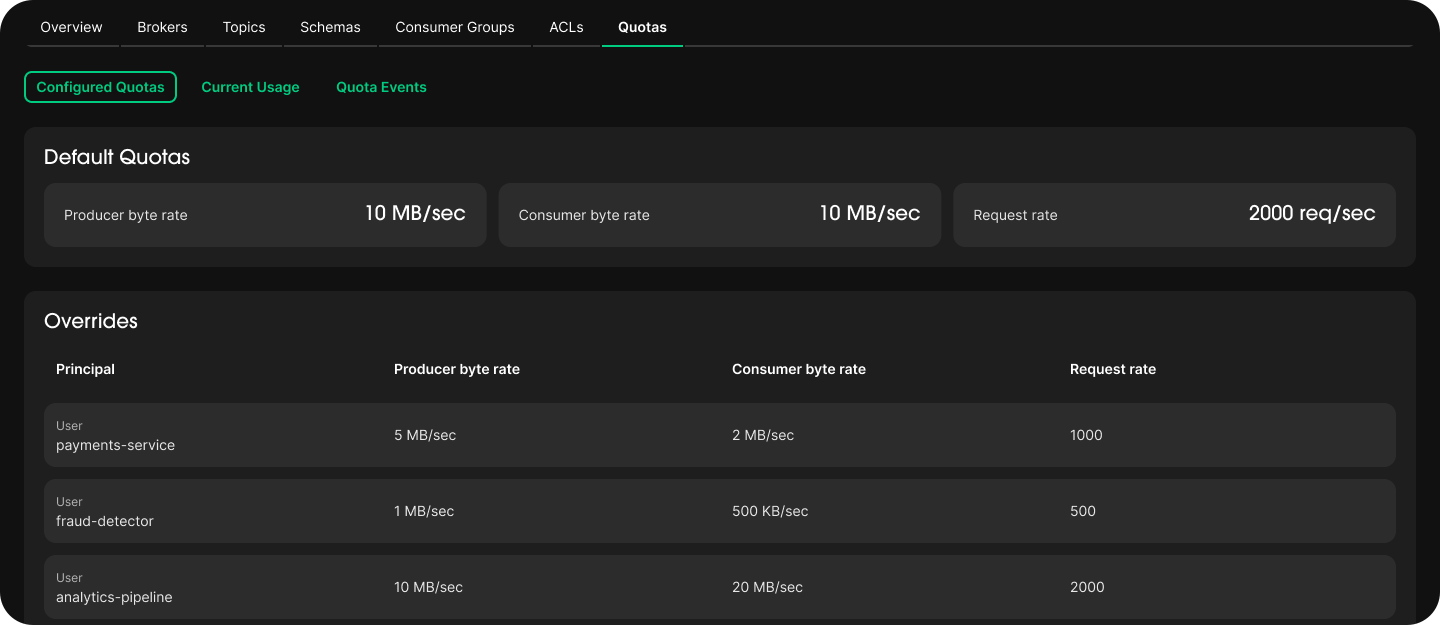
Overview
Shows two levels of quota configuration:
- Default quotas: Cluster-wide limits that apply to all clients unless overridden.
- User overrides: Per-principal limits that take precedence over the defaults for specific clients.
Quota Types
| Quota | Description |
|---|---|
| Producer byte rate | Maximum bytes per second a producer can send to the cluster. |
| Consumer byte rate | Maximum bytes per second a consumer can fetch from the cluster. |
| Request percentage | Maximum fraction of I/O and network threads a client can use. Limits CPU impact from a single client. |
User Overrides
Overrides apply custom limits to a specific principal, identified by username.
They are useful when:
- A high-throughput service needs a higher limit than the cluster default.
- A low-priority consumer needs to be throttled to protect production workloads.
- A Zilla Gateway service account needs elevated throughput for aggregated API traffic.
Tips
If your API Products serve high-volume consumers, consider setting a user override for the Gateway's service principal to avoid hitting cluster-wide default limits during peak traffic.
Interpreting Throttling
When a client exceeds its quota, Kafka throttles it by introducing artificial delays in responses. You may see:
- Increased produce or consume latency for affected clients.
THROTTLING_QUOTA_EXCEEDEDerrors in client logs.
Use this view to identify clients approaching or exceeding their quotas and adjust overrides accordingly.