

Brokers
Brokers
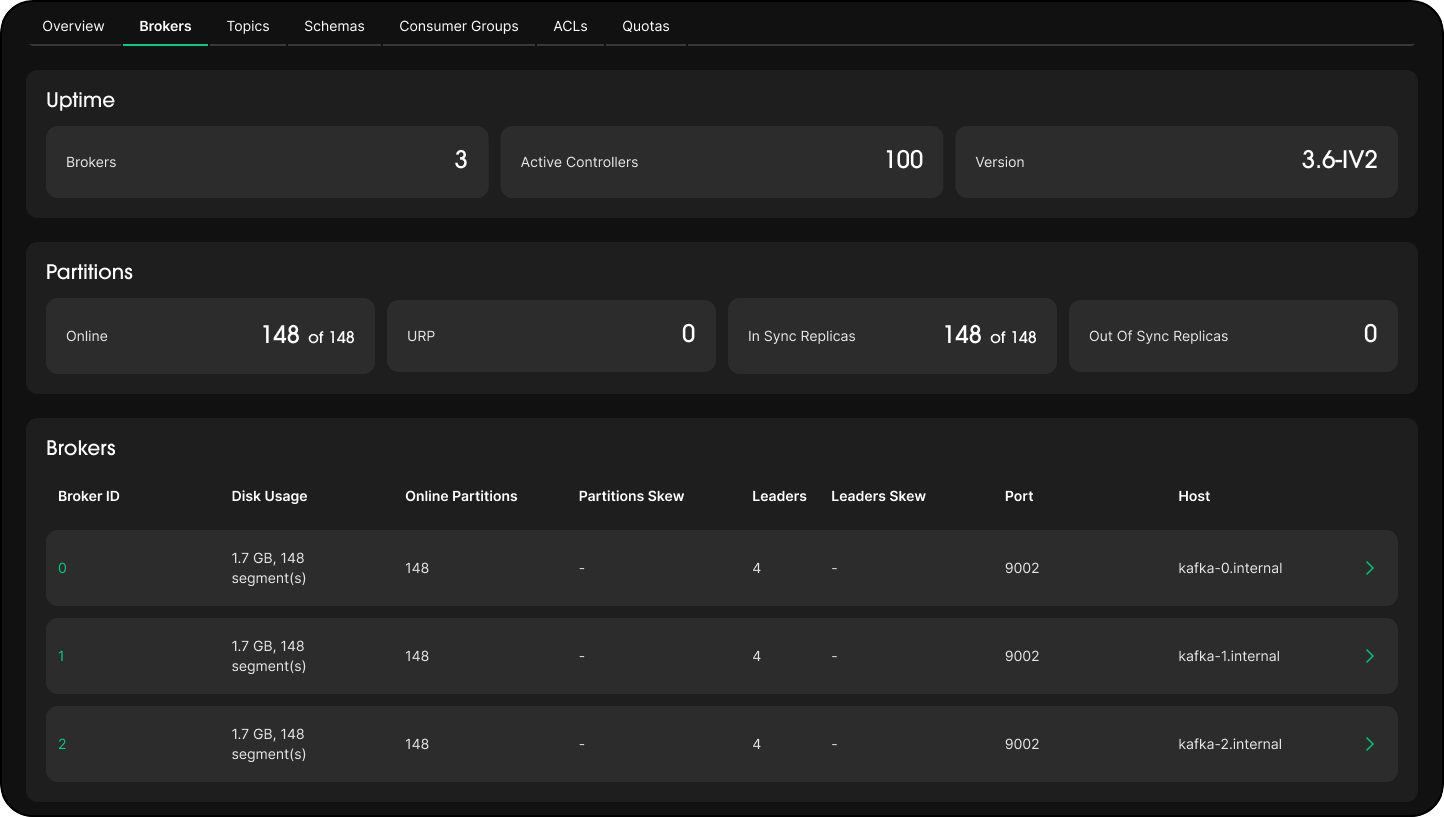
The Brokers tab shows the operational state of all Kafka brokers in your cluster.
Overview
Displays cluster-wide health at a glance:
- Broker count: Total number of brokers in the cluster.
- Active controller: The broker currently acting as the cluster controller.
- Kafka version: The version running across the cluster.
- Online partitions: Number of partitions currently online vs total.
- Under-replicated partitions (URP): Partitions where the number of in-sync replicas (ISR) is below the replication factor. A non-zero URP count indicates replication lag or broker failure.
- In-sync replicas (ISR): Partitions where all replicas are caught up. Lower ISR counts signal potential data loss risk.
Warning
A high URP count or decreasing ISR is an early indicator of broker instability. Investigate immediately to avoid data loss.
Broker Details
Displays a per-broker breakdown:
- Host and port: The advertised listener address for each broker.
- Leader count: Number of partition leaders hosted on this broker. Uneven leader distribution can cause hotspots.
- Disk usage: Storage consumed on the broker. Monitor to avoid disk pressure.
- Partition balance: Whether partitions are evenly distributed. Imbalanced clusters affect throughput and latency.
Use this view to identify overloaded brokers and plan partition reassignments.