

Certificate Authorities
Certificate Authorities
Certificate Authorities (CAs) are used to sign mTLS client certificates, enabling mutual TLS authentication for your plans.
When mTLS is configured on a plan, the gateway validates incoming client certificates against the trusted CAs defined here. Only clients presenting a certificate signed by a registered CA will be granted access.
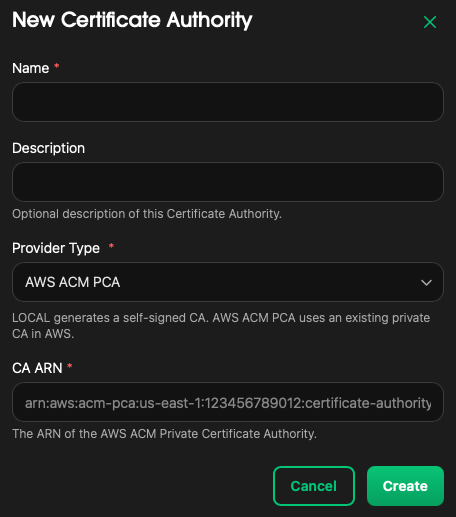
Add Certificate Authority
- Navigate to
Certificate Authorities - Click
New Certificate Authority - Enter the
Nameof the certificate authority - Optionally enter a
Description - Select a
Provider Type:LOCALAWS ACM PCA- Enter the
CA ARN
- Enter the
- Click
Create
Delete Certificate Authority
- Navigate to
Certificate Authorities - Select the certificate authority to remove
- Click
Delete → Delete
Warning
Deleting a Certificate Authority will break mTLS authentication for any plan that relies on it. Ensure no active plans reference this CA before deleting.