

API Products
API Products
API Product is a self-contained, reusable data or service asset designed to deliver consistent, reliable, and secure functionality to internal or external consumers.
API Products are created, managed, and maintained within the API Catalog to ensure standardization and reusability across multiple environments.
Create API Product
- Navigate to
API Catalog → [catalog] - Click
New API Product - Enter the
Details:Name– A unique identifier for the API ProductDescription– (Optional) A short summary of the API Product’s purpose
- Under
Specification, select:Workspace– The workspace where the API design residesProject– The project containing the API specificationComponent– The specific API definition to include
- Configure
Server Settings:Define one or more server endpoints where the API Product will be available after deployment.
Provide the following details:
Server Name– Unique identifier for the serverDisplay Name– (Optional) A human-readable label for the serverProtocol– (Only Kafka is currently supported)Bootstrap Server– (Required) Specify the Kafka Bootstrap Server using the following format.{server}.<domain>:9094Replace
<domain>with your Gateway bootstrap server. For Example:{server}.staging.platform.net:9094Schema Registry URL– (Optional) Provide the Schema Registry endpoint in the format below.https://{server}.<domain>:8081Replace
<domain>with the Gateway Schema Registry URL. For Example:https://{server}.staging.platform.net:8081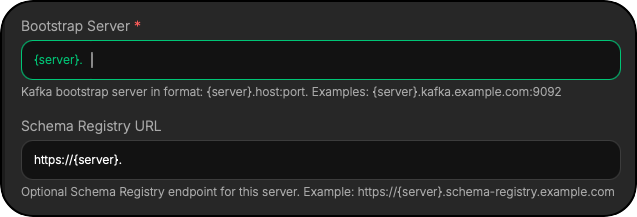
After deployment,
{server}will be substituted with the API Product name and version by gateway.
- Select
Plans:- Choose one or more predefined plans for the API Product.
- Alternatively, create a Custom Plan and configure:
Rate Limit– (e.g.,10000 bytes/sec,50000 bytes/sec, orCustom)Security– (e.g., API Key authentication)
- Review & Create:
- Review all configuration details, including Specification, Servers, and Plans
- Click
Create API Productto complete setup