

Deployments
Deployments
The Deployments section provides visibility into all API Products deployed within a specific environment and their associated applications.
View Deployments
Navigate to Environments → [environment] → Deployments to view a list of all API Products deployed in that environment.
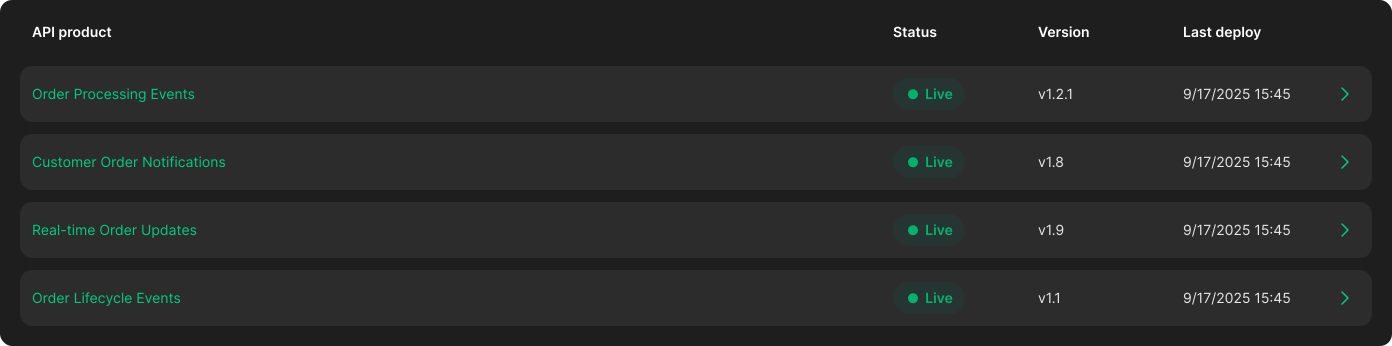
Each deployment entry includes the following details:
- API Product: The name of the deployed API Product
- Status: Indicates whether the deployment is
live - Version: The version of the API Product currently deployed
- Last Deploy: Timestamp of the most recent deployment
View Applications per Deployment
To view applications consuming a specific API Product, navigate to:
Environments → [environment] → Deployments → [deployment] → Applications
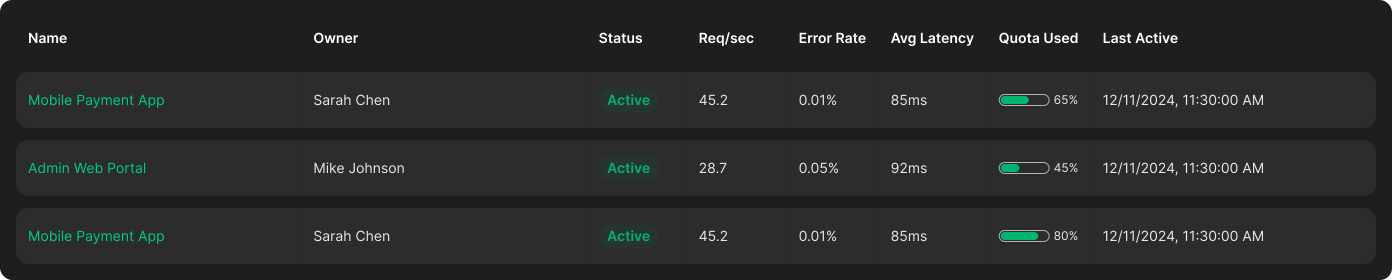
Each application entry displays key usage metrics and operational data:
- Name: The application name
- Owner: The user or team that owns the application
- Status: Indicates whether the application is active or inactive
- Req/sec: Current request throughput per second
- Error Rate: Percentage of failed requests
- Avg Latency: Average response latency
- Quota Used: Percentage of allocated quota consumed
- Last Active: Timestamp of the last activity from the application