

Applications
Applications
Applications provide a secure and governed way for internal & external clients to consume the API Products.
Create an Application
Navigate to Applications → Create Application
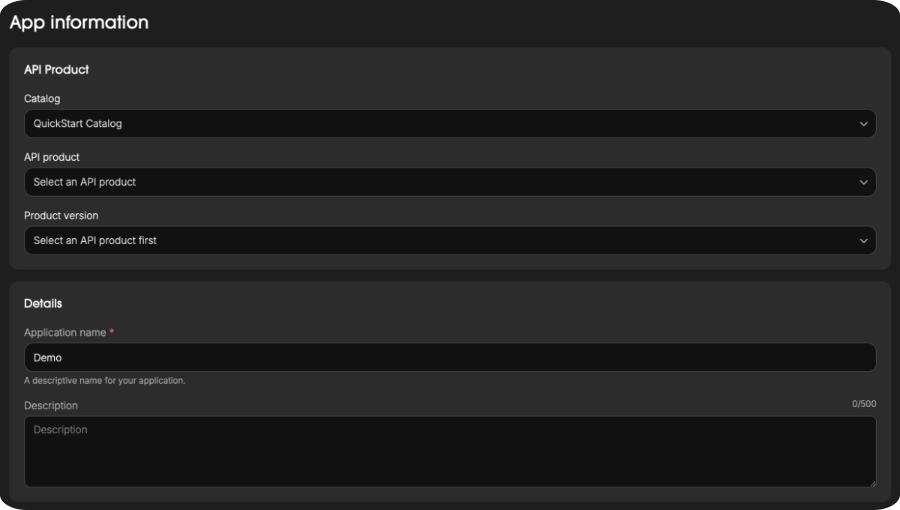
Step 1: Add App Information
Specify the details for your new application.
- Catalog: Select the catalog where the API Product is published.
- API Product: Choose the API Product to connect with.
- Product Version: Select the version of the chosen API Product.
- Application Name: Enter a descriptive name for your application.
- Description (optional): Add additional context or notes.
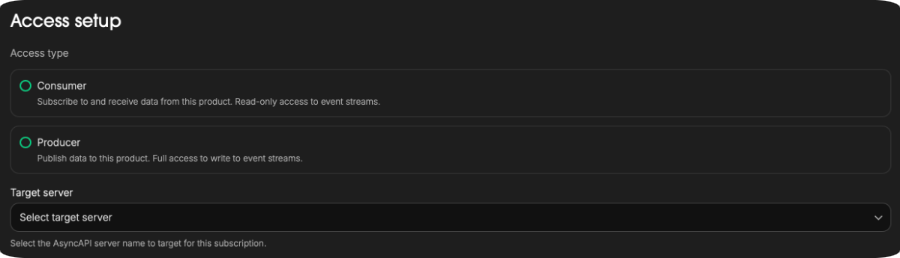
Step 2: Add Access Setup
Define how your application will interact with the selected API Product.
- Access Type
- Consumer: Subscribe to and receive data (read-only access).
- Producer: Publish data to event streams (read-write access).
- Target Server: Select the server name for this subscription.
Step 3: Review and Create
Review your configuration:
- API Product Name and version
- Application Details Name and description
- Access Type and target server
Click Create App to finalize the setup and register your application.